

Mac app · DMG Studio
Beautiful from the very first window.
DMG Studio makes the disk images you use to ship Mac apps on the web. Design the window Finder shows, export, then sign, notarize and validate — every pre-release step in one app.
macOS 26 or later
How it works
Import. Design. Ship.
- 01
Import
Drop in the .app you exported from Xcode. DMG Studio reads its name, version, icon and signature.
- 02
Design
Background, icon size and position, text and arrows — shape what Finder shows, right on the canvas.
- 03
Ship
Export the DMG, sign it, have Apple notarize it and staple the ticket. One last validation and it’s ready to go.
Features
Everything before release, in one app.
Design exactly what Finder shows
Window size, icon positions, text, arrows and images appear in Finder just as you placed them. Switch between Light and Dark to check both.
Six built-in styles
Default, Minimal, Professional, Dark, Light and Developer. Save any design as a template and reuse it for your next app.
Layout written directly — no Finder scripting
Instead of driving Finder with AppleScript, DMG Studio writes the layout (.DS_Store) itself. No Automation permission, and the same result every time.
Signing and notarization, built in
DMG Studio checks your app’s signature, Hardened Runtime and timestamp and tells you what’s missing. Signing the DMG, notarizing with Apple and stapling run only when you click.
Validated after every export
Checksum verification, a mount test and Gatekeeper’s verdict make sure nothing is broken or out of place before you ship.
Your app stays untouched
DMG Studio works on a copy of your .app and never changes its contents or signature. Cancel midway and no mounted images or temporary files are left behind.
Screens
A look inside
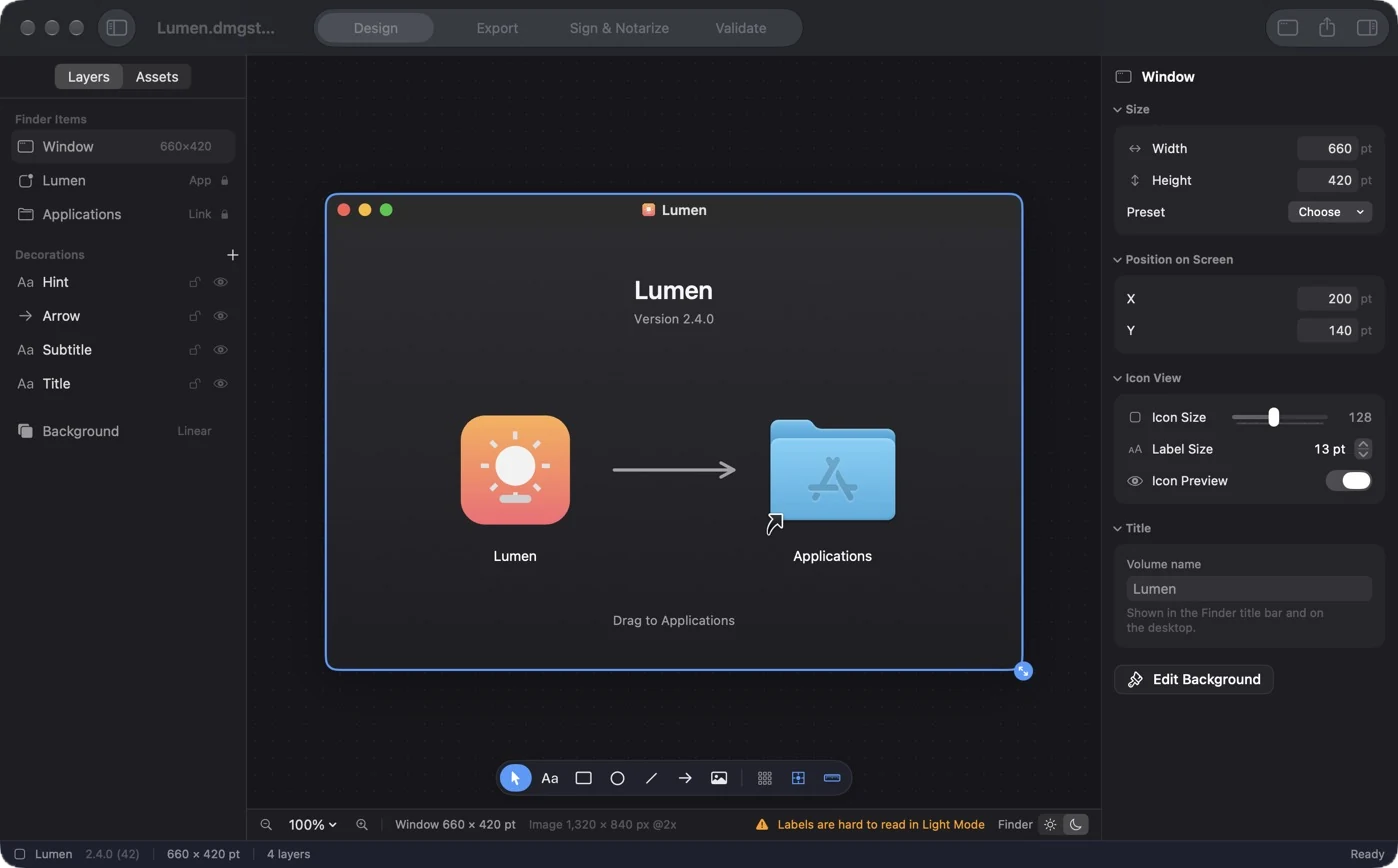
Arrange on the canvas, export, check the signature — these are the real screens.
Creative Studio: layers on the left, the Finder window in the middle, size and position on the right.
“Lumen” in these screenshots is a fictional app used for illustration.
Specs
Specs
- Requires
- macOS 26 or later
- Languages
- Japanese, English
- Distribution
- Direct download from this site (not on the App Store)
- DMG output
- Compressed (zlib, LZFSE, LZMA, bzip2) or read/write image (HFS+)
- Projects
- Saved as .dmgstudio documents you can edit later
- Signing & notarization
- Requires a Developer ID from the Apple Developer Program
- Developer
- R studio
One app per DMG. APFS disk images are not supported.
FAQ
Frequently asked questions
What does DMG Studio do?
It imports the .app you exported from Xcode, lets you design the window Finder shows (background, icon size and position, text and arrows) and exports a DMG ready to distribute. Signing, Apple notarization, stapling the ticket and validating the result all happen in the same app.
How do I set the DMG background and icon positions?
Place a background on the canvas and move the icons to the size and position you want, or start from one of the six built-in styles. The layout is written straight into the DMG, so there is no Finder scripting involved.
What do I need for signing and notarization?
A Developer ID certificate from the Apple Developer Program. For notarization you can authenticate with a keychain profile, an App Store Connect API key or your Apple ID.
Is it on the App Store?
No. DMG Studio is distributed only from this page as a direct download. When a new version is out, the app lets you know.
Which DMG formats can it export?
Compressed images (zlib, LZFSE, LZMA, bzip2) and read/write images (HFS+). APFS images are not supported, and each DMG holds one app.
Does it change the app I import?
No. DMG Studio works on a copy of the .app and leaves its signature and contents as they are. If you cancel, no mounted images or temporary files are left behind.
What are the system requirements?
macOS 26 or later. The interface is available in Japanese and English.
Ship your next release with DMG Studio.
Take the app you finished in Xcode and make it ready to hand out.
macOS 26 or later